TL;DR
- Enterprise workflow automation now spans three generations: RPA (rule-based bots), iPaaS (connector-based automation), and AI-native (agent-driven reasoning).
- Traditional tools still win on structured, high-volume, low-exception work.
- AI-native platforms handle unstructured data, judgment calls, and exceptions that break Gen 1 and Gen 2 tools.
- Most enterprises will run both generations side by side, not replace one with the other.
- Evaluating a platform now requires questions about governance, hallucination handling, and framework independence, not just connector count.
Enterprise workflow automation is software that runs multi-step business processes across teams and systems, replacing manual handoffs with orchestrated execution. It differs from single-task automation, which handles one action, and single-system automation, which stays inside one application. In 2026, the category has split into three generations, and the newest one changes what “automated” actually means for a business process.
Jump to: The three generations | Top use cases | How to evaluate a platform | FAQ
What is enterprise workflow automation?
Enterprise workflow automation uses software to run multi-step business processes across teams and systems, replacing manual handoffs with orchestrated execution. A process that once required five people passing a form, a spreadsheet, and an email chain runs instead as a single tracked sequence.
This is different from single-task automation, which triggers one action, and single-system automation, which stays inside one application, like an auto-reply rule in your CRM. Enterprise workflow automation crosses systems and teams by design.
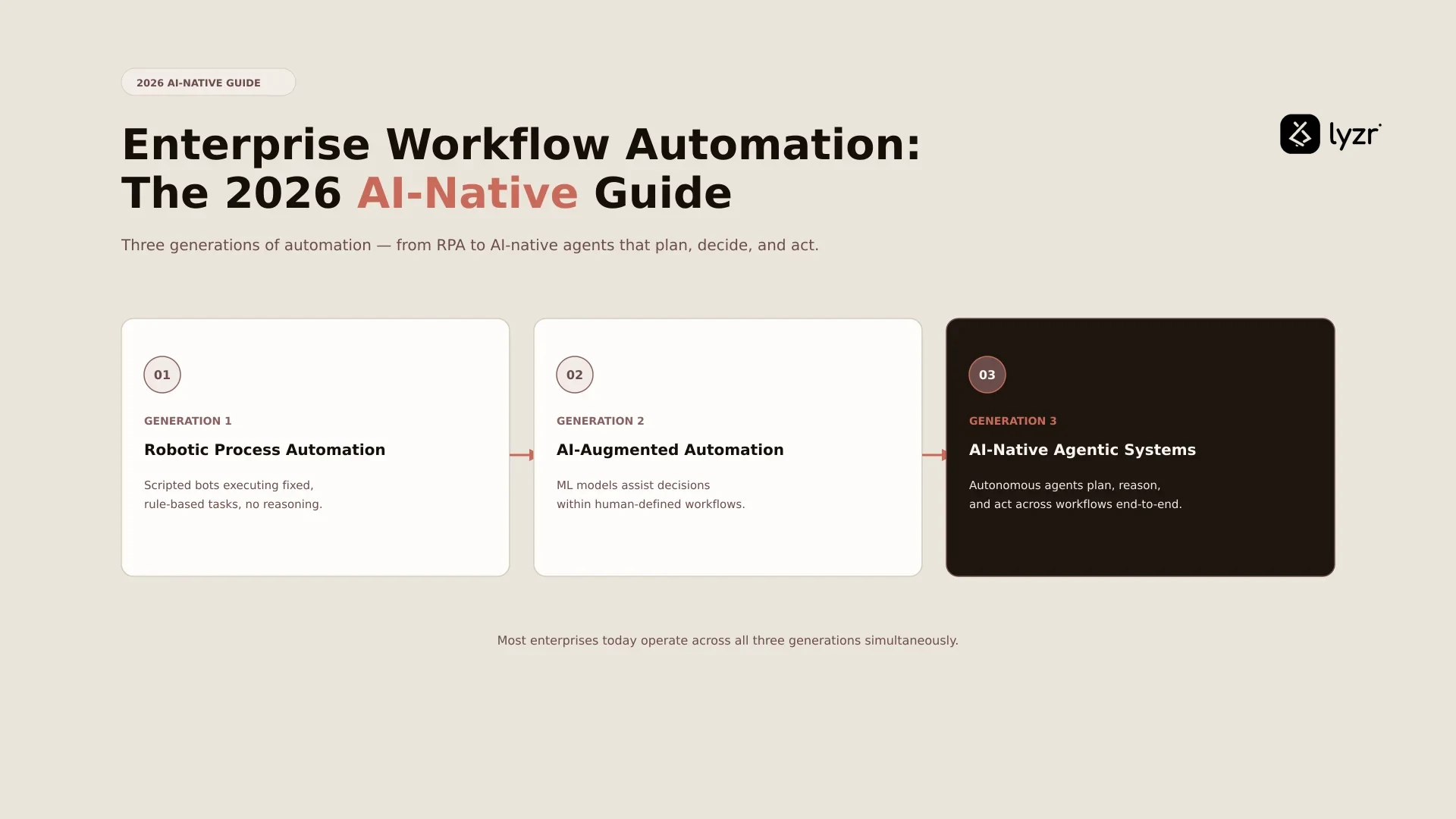
The category has moved through three generations: rule-based RPA, connector-based iPaaS, and now AI-native agentic automation.
According to McKinsey State of AI 2025, sixty-two percent of survey respondents say their organizations are at least experimenting with AI agents, and twenty-three percent of respondents report their organizations are scaling an agentic AI system somewhere in their enterprises. That shift is the reason this guide treats the category as an evolution, not a fixed set of tools. For background on the underlying technology, see what AI agents actually do, and how this fits the wider enterprise automation category. This category also sits alongside broader workflow automation discussions, where a wide range of teams, not just Fortune 2000 buyers, evaluate the same three-generation shift.
The three generations of enterprise workflow automation
No major vendor page currently frames enterprise workflow automation this way, but the three-generation split is the clearest way to understand where your options actually sit.
Gen 1: RPA and rule-based automation. UiPath, Automation Anywhere, and Blue Prism built this generation on deterministic bots that mimic human clicks and keystrokes. RPA (robotic process automation) is strong on high-volume, well-defined tasks with fixed inputs. It struggles the moment an exception appears or the interface changes, and it cannot read unstructured documents without added tooling.
Gen 2: iPaaS and low-code workflow tools. n8n, Zapier, Make, Workato, and Microsoft Power Automate connect cloud applications through pre-built connectors instead of screen scraping. iPaaS (integration platform as a service) is faster to build with than RPA and more resilient to interface changes. It is still deterministic: the workflow logic is fixed in advance and cannot reason about ambiguity. If you are actively comparing this generation to what comes next, Lyzr vs n8n walks through the practical differences.
Gen 3: AI-native agentic workflow automation. Salesforce Agentforce, IBM watsonx Orchestrate, Microsoft Copilot Studio, and Lyzr build workflows around agents that reason about a goal, choose tools dynamically, and handle exceptions on their own. This generation reads unstructured inputs like emails, contracts, and call transcripts natively, something Gen 1 and Gen 2 cannot do without heavy pre-processing. It also introduces requirements Gen 1 and Gen 2 never needed: hallucination detection, decision auditing, and runtime observability. These are the agentic workflows built for unstructured data retrieval at the core of the workflow, not bolted on after. For a direct look at how Lyzr’s approach compares to other Gen 3 entrants, see Lyzr vs Agentforce and Lyzr vs Microsoft Copilot.

Core capabilities every enterprise platform needs
Every generation has to answer for the same seven capabilities. What differs is the mechanism behind each one.
- Workflow designer (visual, code, or natural language)
- Connector library for ERP, CRM, HRIS, and ITSM systems
- Trigger and event handling
- Audit trail and observability
- Human-in-the-loop and exception handling
- RBAC (role-based access control) and identity governance
- Deployment options across cloud, private cloud, and on-premise
How the three generations handle core capabilities
| Capability | Gen 1: RPA | Gen 2: iPaaS | Gen 3: AI-native |
|---|---|---|---|
| Workflow designer | Visual bot recorder | Node-based builder | Visual, code, or prompt |
| Connector library | UI and API connectors | Broad API connectors | API connectors plus dynamic tool use |
| Exception handling | Rule-based fallback | Rule-based fallback | Agent-driven reasoning |
| Unstructured data | Requires OCR pre-processing | Limited, needs parsing | Native document and text handling |
| Reasoning about goals | Fixed script | Fixed path | Agent plans and adapts steps |
| Governance and audit | Process-level audit | API call-level audit | Decision-level audit plus policy checks |
| Deployment flexibility | Cloud and on-premise | Mostly cloud | Cloud, VPC, sovereign, on-premise |
Multi-agent systems add another layer here: coordinating several specialized agents on one workflow, covered in our multi-agent framework guide.

Top use cases across the enterprise
HR. Onboarding, offboarding, and document generation run cleanly as orchestrated sequences. Diane handles multi-step HR processes end to end, and the HR playbook breaks down the exact flows. AI-driven onboarding also extends into AI-driven recruitment, where document generation and compliance checks run in the same sequence. This full function is covered in our AI in HR guide, and use cases specific to HR teams are catalogued in the HR use case template.
IT. Incident management, ticket routing, and access provisioning benefit most from AI-native reasoning about priority and intent, not just keyword matching.
Finance. Invoice processing, expense approval, and reconciliation involve unstructured PDFs and exceptions that stall rule-based tools. AI agents for finance and the CFO use case template go deeper, and Amadeo shows this applied to banking specifically, alongside the banking playbook.
Sales. Lead qualification, nurture sequences, and order processing move faster with an agent that adapts to each prospect. Lead generation and order fulfillment require coordination across multiple teams, and Jazon runs this cycle, detailed in the sales playbook.
Customer support. Ticket triage, response drafting, and escalation routing need context from history and sentiment. Jeff and the customer support use case template cover this in practice.
Legal and compliance. Contract review against a playbook, policy monitoring, and regulatory reporting all involve dense, non-standard documents, which is exactly where Gen 3 reasoning earns its place over rule-based extraction.
Marketing teams run a related pattern: AI-driven automation streamlines campaign scheduling, lead scoring, and performance reporting across channels, and procurement teams follow a similar playbook in the strategic procurement automation playbook. Browse the full range in 101 AI agent use cases, the Architect agent use case template, or the broader AI agent use case reference.
AI-native vs traditional: when to choose each
Choose traditional RPA or iPaaS when the workflow is fully deterministic. Structured inputs, fixed rules, a near-zero exception rate, and a hard requirement to minimize cost-per-run all point toward Gen 1 or Gen 2. High-volume invoice matching against a fixed rule set is the clearest example.
Choose AI-native automation when the workflow involves unstructured data, ambiguity, or judgment calls. Contract review, ticket classification, and escalation triage all break rule-based systems because the right next step depends on context, not a lookup table.
For most enterprises, the honest answer is to run both. Keep RPA and iPaaS handling the structured, high-volume core. Deploy an AI-native layer for the ambiguous, unstructured edge cases that were never automatable before. This is not a replacement decision. It is a division of labor.
There is no single solution for enterprise workflow management and automation. The right approach depends on factors like workflow complexity, budget, goals, and your existing automation footprint. Solutions typically fall into three paths: buying ready-made software, building a custom solution from the ground up, or using a low or no-code platform to create workflows with minimal coding.
How to evaluate an enterprise workflow automation platform (7 questions)
1. What generation does the platform belong to? Ask whether the architecture reasons from the ground up or bolts AI onto a deterministic engine. Bolted-on AI features do not make a Gen 1 or Gen 2 platform AI-native.
2. How does it handle exceptions and unstructured data? Ask for a live demo of a judgment call, not a slide. Our agent diagnostic tool is built for exactly this kind of stress test.
3. What deployment modes are supported? Regulated industries need private cloud, on-premise, or sovereign options. Read on-premise vs cloud AI before you commit to one path.
4. Is it framework agnostic? Enterprises rarely standardize on one agent framework. A framework-agnostic platform orchestrates agents built on LangGraph, CrewAI, or any other stack without lock-in.
5. How does it govern AI decisions? RBAC, audit trails, and hallucination detection are non-negotiable for regulated workflows. The Lyzr Agent Control Plane is built specifically for this layer.
6. What integration surface does it have? Pre-built connectors matter, but MCP (Model Context Protocol) support and open API access matter more for long-term flexibility. See what a mature agent framework should offer here.
7. Can it interoperate with your existing RPA and iPaaS investments? A Gen 3 platform should trigger your existing UiPath bots and n8n flows as part of a larger process, not force you to rebuild everything.
Production reality: governance, security, observability
A working demo and a production deployment are not the same thing, and this gap is where most AI-native rollouts stall.
Governance has to sit at the center. A Control Plane gives you centralized RBAC, per-step audit trails, and policy enforcement on every tool call an agent makes, regardless of which framework built the agent. Responsible AI as a Service applies this governance consistently across every workflow rather than per team.
Hallucination detection has to run at execution time, not just during testing. Lyzr’s Hallucination Manager intercepts unreliable outputs before they reach a downstream system.
Observability needs full-trace visibility, from trigger through every agent decision and tool call, not just a success or failure log. And deployment mode has to match your data residency requirements: managed sovereign, VPC, or fully on-premise for regulated industries, detailed in Sovereign AI.
This gap is not hypothetical. According to Deloitte’s State of AI in the Enterprise 2026 report, agentic AI usage is poised to rise sharply in the next two years, but oversight is lagging, with only one in five companies having a mature model for governance of autonomous AI agents. A global payments company runs enterprise workflow automation across multiple frameworks under one unified Control Plane, with compliance and rollback handled centrally rather than by individual teams. See more in our customers and case studies.

Frequently asked questions
What is enterprise workflow automation?
Enterprise workflow automation is software that runs multi-step business processes across teams and systems, replacing manual handoffs with orchestrated execution. It has evolved through three generations: RPA, iPaaS, and AI-native.
What is the difference between RPA and workflow automation?
RPA is rule-based bots automating structured tasks, typically at the UI or API level. Workflow automation is broader, orchestrating multi-step processes across systems, and may use RPA bots as one execution surface within a larger flow.
What is the difference between iPaaS and workflow automation?
iPaaS focuses on connecting systems through connectors and data flows. Workflow automation focuses on orchestrating human and system steps end to end. Modern workflow platforms often include iPaaS-like connectors as part of a larger sequence.
What is AI-native workflow automation?
AI-native workflow automation is Gen 3 automation, where agents reason about goals, choose tools dynamically, handle exceptions, and work with unstructured data. This differs from Gen 1 or Gen 2 platforms that add AI features to a deterministic engine.
What are the best enterprise workflow automation platforms in 2026?
It depends on generation and use case. Gen 1 leaders include UiPath and Automation Anywhere. Gen 2 leaders include n8n, Zapier, and Workato. Gen 3 leaders include Salesforce Agentforce, IBM watsonx Orchestrate, and Lyzr for framework-agnostic deployment.
How do I choose between traditional and AI-native workflow automation?
Choose traditional automation for structured, high-volume, low-exception workflows. Choose AI-native automation for unstructured data, ambiguous inputs, or high exception rates. Most enterprises end up running both generations side by side.
What are common enterprise workflow automation use cases?
Common examples include HR onboarding, IT ticket routing, finance invoice processing, sales lead qualification, customer support triage, and contract review. Different use cases fit different generations of the technology.
How do I evaluate a workflow automation platform?
Apply seven questions: what generation it belongs to, how it handles exceptions, what deployment modes it supports, whether it is framework agnostic, how it governs AI decisions, what its integration surface looks like, and whether it interoperates with your existing tools.
How does enterprise workflow automation handle governance and compliance?
Through RBAC, audit trails, policy enforcement, and hallucination detection for AI-native platforms. Regulated industries typically require managed sovereign or on-premise deployment to meet data residency and compliance requirements.
How do I run enterprise workflow automation in production?
Production deployment needs governance, observability, hallucination controls for AI-native workflows, and a framework-agnostic Control Plane. Deployment mode should match your data residency requirements before you scale beyond a pilot.
Where to go from here
Your next step depends on where you sit in the decision.
Comparing traditional workflow vendors against a Gen 3 option: read Lyzr vs n8n. Still learning what AI-native actually adds: read agentic workflows. Building the business case for your CIO or CFO: use the agentic AI roadmap playbook. Operating in a regulated industry: start with Sovereign AI. Planning a production deployment: work through how to take agents to production.
Ready to build or evaluate now: start in Lyzr Studio or Lyzr Architect, or book a demo with our team. You can also see how automation applies to banking, browse our revenue and sales team resources, or explore how platform teams and digital transformation teams use Lyzr, including in telecommunications, or work with one of our partners.
Book A Demo: Click Here
Join our Slack: Click Here
Link to our GitHub: Click Here