TL;DR
- AI agent use cases are workflows an autonomous agent runs end-to-end, not just assists with.
- Five categories cover almost every enterprise deployment: customer-facing, employee-facing, function-specific, industry-specific, and multi-agent.
- Pick your first use case with five questions: business impact, data structure, failure cost, workflow documentation, and ownership.
- JPMorgan Chase, Verifone, and Crown Castle are running Lyzr agents in production today.
AI agent use cases are business workflows where an autonomous agent does the work itself, start to finish, instead of waiting for a human to approve each step.
That single distinction is why this category gets confused with copilots, RPA, and generative AI chat tools so often. Most vendor pages list use cases without ever explaining what actually qualifies. You end up with a pilot that looks like automation with better branding, and a leadership team asking why the ROI hasn’t shown up.
This guide fixes that. You’ll get a clear definition, the five categories that cover almost every enterprise deployment, a matrix of the top use cases by function and industry, a five-question framework for picking your first one, and three named enterprise deployments running in production right now.
What are AI agent use cases?
An AI agent use case is a business scenario where an autonomous agent plans, decides, and executes a multi-step task toward a goal, using tools and data along the way, without a human driving each step.
That’s the line that separates agents from assistants. A copilot drafts an email for you to send. An AI agent reads the inbound request, checks the customer record, drafts the response, applies the discount rule, and sends it, logging every step for audit.
Sixty-two percent of survey respondents say their organizations are at least experimenting with AI agents, according to McKinsey’s State of AI 2025 survey. Twenty-three percent of organizations report scaling AI agents in at least one business function. That’s the current split: most enterprises have started, few have scaled. The rest of this guide is built around closing that distance, starting with the five categories of use case and the framework for choosing where to begin.

AI agents vs copilots vs RPA vs generative AI assistants
Four categories get lumped together in vendor marketing, and only one of them is actually an agent. Knowing the difference changes what you should expect to pay for, and what you should expect it to do without you.
AI agents are autonomous. Given a goal, they plan the steps, call the tools they need through function calling or the Model Context Protocol (MCP, a standard for connecting agents to external data and tools), and adapt when something in the workflow changes. They own the outcome, with human-in-the-loop checkpoints where the risk calls for one.
Copilots, including Microsoft Copilot, sit inside your existing tools and assist a human in the flow of work. The human stays in the driver’s seat on every decision.
RPA (robotic process automation) automates rule-based, structured tasks. It follows a fixed script and has no reasoning layer, so it breaks the moment a workflow hits an exception it wasn’t scripted for.
Generative AI assistants generate content on demand, a draft, a summary, an image, but they don’t execute anything in your systems of record.
The takeaway: AI agents are the only category of the four that combines reasoning, tool use, and autonomous execution. Salesforce Agentforce, ServiceNow AI Agents, IBM watsonx Orchestrate, Google Vertex AI Agents, and Amazon Bedrock Agents are all racing to build in this category, each with a different orchestration and governance model. Understanding what agentic AI actually is is the fastest way to evaluate any of them.
The five categories of enterprise AI agent use cases
Enterprise AI agent use cases sort into five categories. Mapping a candidate use case to one of these tells you almost immediately what kind of build, governance, and team you’ll need.
Customer-facing agents. These agents handle customer conversations, transactions, and support requests end-to-end, across channels, without escalation for routine cases. Cross-channel support agents, AI phone support, and automated claims intake are the most common deployments. Explore customer service agents for the function-specific build.
Employee-facing agents. These agents serve internal teams: answering policy questions, running onboarding, and searching across scattered internal systems for an answer a human would take an hour to find manually. HR onboarding and IT helpdesk triage are the standard starting points.
Function-specific agents. These agents automate work inside a single business function like sales, marketing, or procurement. An AI SDR qualifying inbound leads, an RFP scout scanning contracts for risk clauses, these are function-specific by design.
Industry-specific agents. These agents are built for the compliance and data structures of a regulated vertical. KYC (Know Your Customer) processing in banking, claims underwriting in insurance, and clinical decision support in healthcare all require domain rules baked into the agent, not bolted on after.
Multi-agent workflows. Multiple specialized agents, coordinated by an orchestration layer, handle a process too complex for a single agent. Revenue-leakage detection across SAP and SharePoint, where one agent monitors, another investigates, and a third generates the reconciliation report, is a working example. Read how a Control Plane governs this kind of workflow, and how multi-agent architecture and agent orchestration patterns hold it together.

Top AI agent use cases by function
The fastest path to a first deployment usually runs through a function you already manage, not a greenfield project. Sales, marketing, HR, customer support, procurement, and legal are where most enterprise AI agent use cases start, because the workflows are documented and the data already lives in a system of record.
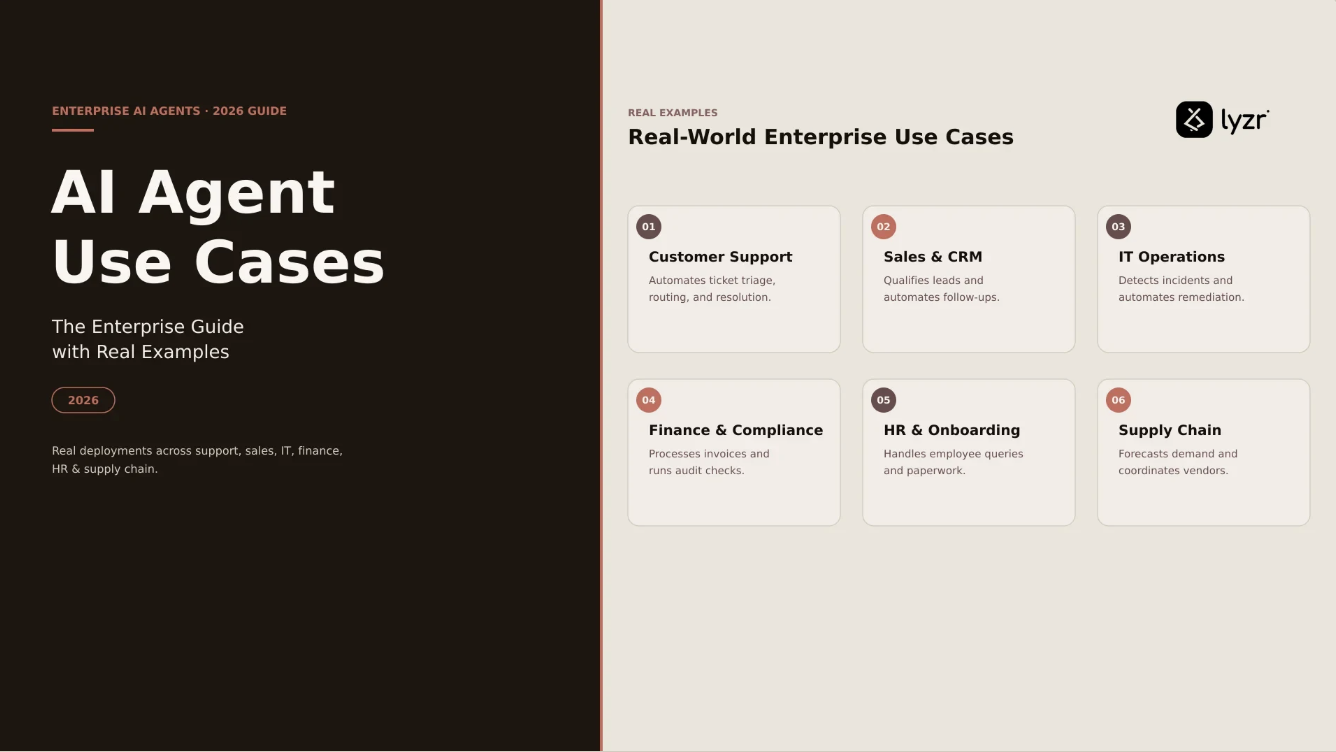
AI agent use cases by function
| Function | Top agent use cases | Named Lyzr agent |
|---|---|---|
| Sales | SDR outreach, deal nurturing, lead enrichment | Jazon |
| Marketing | Campaign execution, AEO/GEO optimization, social content | Skott |
| HR | Employee onboarding, hiring screens, benefits Q&A | Diane |
| Customer support | Cross-channel triage, email resolution, escalation routing | Jeff |
| Procurement | Supplier onboarding, contract review, performance tracking | – |
| Legal & compliance | RFP scouting, clause extraction, litigation review | Dwight |
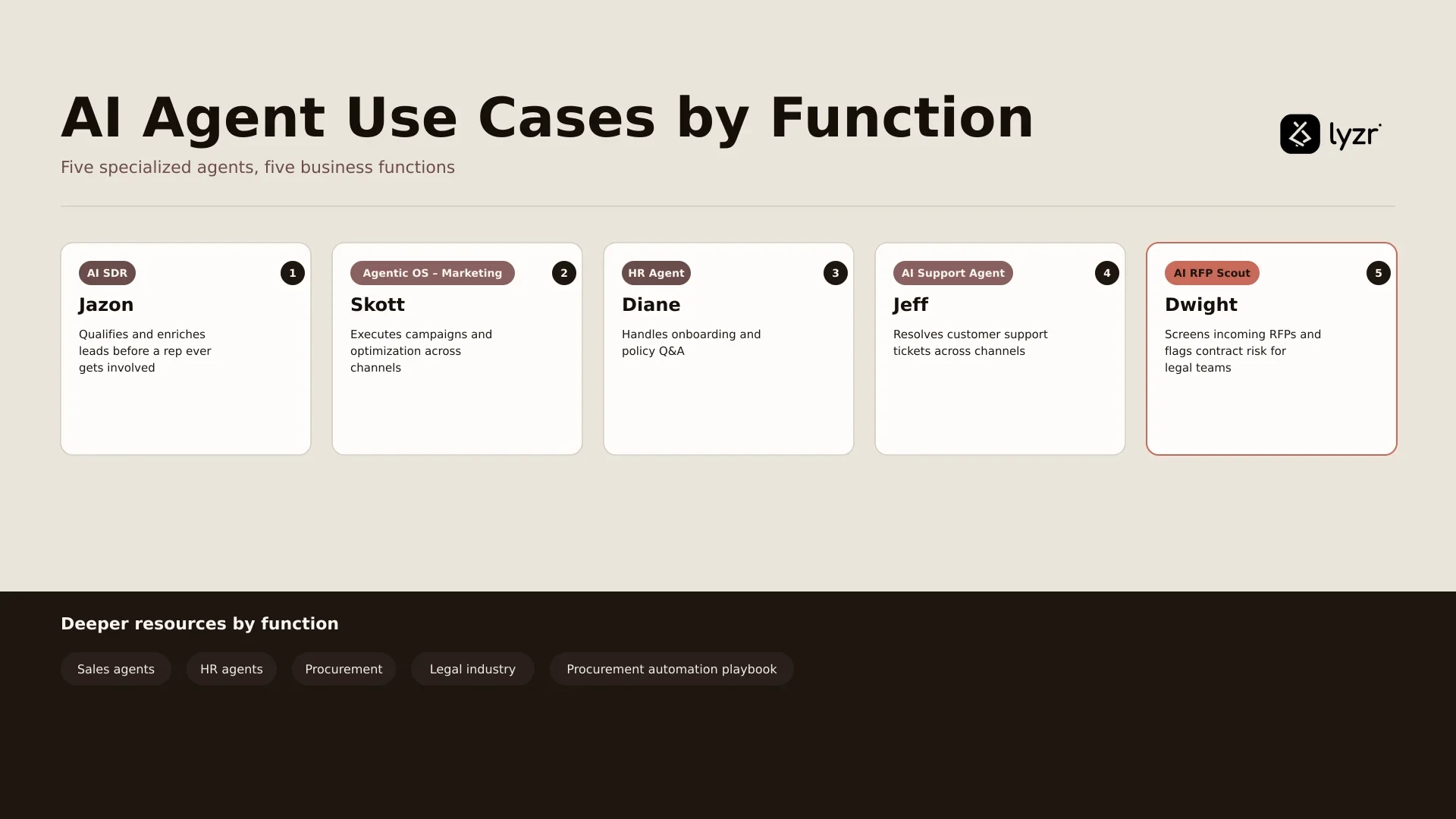
Jazon works as an AI SDR, qualifying and enriching leads before a rep ever gets involved. Skott runs as an Agentic OS for Marketing, executing campaigns and optimization work across channels rather than just drafting copy. Diane handles HR agent use cases like onboarding and policy Q&A. Jeff resolves customer support tickets across channels as an AI support agent. Dwight, an AI RFP scout, screens incoming RFPs and flags contract risk for legal teams.
Deeper resources by function: sales agents, HR agents, procurement, legal industry, plus the strategic procurement automation playbook.
Top AI agent use cases by industry
Regulated industries need agents built with compliance rules native to the workflow, not layered on afterward. Here’s where AI agent use cases in finance, healthcare, and government concentrate today.
Banking. KYC processing, AI loan origination, and regulatory monitoring are the leading AI agent use cases in banking. Amadeo, Lyzr’s AI Banking Agent, is built for these regulated workflows. See banking automation and the BFSI dispute management playbook.
Insurance. Claims processing, policy underwriting, and litigation clause extraction dominate AI agent use cases in insurance. Benjie, Lyzr’s AI Insurance Agent, handles this category end-to-end.
Healthcare. Patient triage, clinical decision support, and revenue cycle management are the top AI agent use cases in healthcare, almost always deployed inside the provider’s own compliance environment.
Government. Policy analysis, compliance monitoring, and sovereign agent deployments define how agencies use AI agents today. Deployment models that keep data and compute inside jurisdictional boundaries matter most here.
Financial services. Portfolio analysis, wealth advisory, and fraud detection lead adoption beyond core banking.
Retail, telecom, and manufacturing see agents applied to inventory forecasting, network monitoring, and predictive maintenance.
How to pick your first AI agent use case
Most enterprises don’t lack use case ideas. They lack a way to rank them. Run every candidate through these five questions before you commit engineering time.
1. What is the annualized business impact?
Prioritize use cases with measurable cost, revenue, or risk reduction above $1 million a year. Below that threshold, the governance and deployment overhead usually costs more than the win is worth.
2. How structured is the data the agent needs?
Structured data, SQL tables, ERP records, CRM fields, deploys faster and more reliably than unstructured data like scanned documents or call transcripts. Start with the structured workflow.
3. What is the failure cost?
Internal knowledge search and first-draft content generation fail cheaply. Loan approval and medical triage do not. Choose a low-stakes use case first and earn the right to move up the risk curve.
4. Is the workflow already documented?
A written standard operating procedure converts into an agent specification quickly. Undocumented tribal knowledge means your team spends the first month just figuring out what the workflow actually is.
5. Who owns the outcome?
Assign one business owner to the agent before the build starts. Agents without a named owner stall in review, because nobody has the authority to say the output is good enough to ship.
If a candidate use case clears all five, build it first. Run the assessment to formalize the scoring before you commit a sprint to it.

Real deployments: three enterprise use cases in production
Most competing articles on this topic describe hypothetical deployments. Here are three running in production, not pilots.
JPMorgan Chase. The bank has deployed agentic capabilities across its ledger operations, with agents that monitor systemic data feeds in real time and flag anomalies before anything posts, operating under rules that come from an embedded control framework rather than logic the agent invents on its own. Every AI-driven intervention is logged and fully traceable, giving the bank and its stakeholders the audit trail they expect. Lyzr counts JPMorgan Chase among the enterprise customer deployments it builds orchestration patterns around.
Verifone. The global payments company runs a unified Control Plane across its stack, where agents built on different frameworks register centrally instead of being managed team by team. In Verifone’s own words, its agents are “automating payments operations, compliance checks, and merchant support workflows with full traceability, governance, and hallucination management at every step.” Compliance, observability, and rollback all run through the same layer, not through whichever team built the agent.
Crown Castle. The telecom infrastructure company runs agent workflows across SAP, SharePoint, and field data to catch revenue leakage before it compounds, operating inside its own environment rather than a third-party cloud. Lyzr’s customer deployments span Accenture, JPMorgan Chase, Pepsi, and Crown Castle, spanning corporate development, financial ledger operations, and infrastructure revenue assurance.
See how the Control Plane powers each of these deployments, or browse the customer case study library for the full detail.
Frequently asked questions
What are AI agent use cases?
AI agent use cases are business scenarios where autonomous AI agents perform work end-to-end. That’s different from copilots, which assist humans, and RPA, which follows rules without reasoning.
What is the difference between an AI agent and a copilot?
AI agents own a workflow and make decisions autonomously. Copilots assist a human user who stays in control. Agents act; copilots suggest actions for a human to approve.
What are examples of AI agents in real life?
Real examples include JPMorgan Chase’s agentic ledger operations, Verifone’s unified control plane for payments, and Crown Castle’s revenue-leakage detection agents across SAP and SharePoint. These are production systems, not pilots.
What are the best AI agent use cases for enterprises?
The best starting use cases sit on structured data, carry a named business owner, and clear $1 million in annual impact. SDR outreach, HR onboarding, and support triage are common first deployments.
What AI agent use cases work in finance?
KYC processing, loan origination, regulatory monitoring, portfolio analysis, and fraud detection lead finance deployments, with audit trails built in from the start.
What AI agent use cases work in healthcare?
Patient triage, clinical decision support, and revenue cycle management are the leading healthcare use cases, deployed inside the provider’s own compliant environment.
How do I pick my first AI agent use case?
Run it through five questions: annualized impact above $1 million, structured data, low failure cost, a documented workflow, and a named business owner.
What is a multi-agent use case?
A multi-agent use case coordinates several specialized agents through an orchestration layer, such as one agent monitoring, another investigating, and a third reporting.
What is the difference between AI agent use cases and RPA use cases?
RPA automates rule-based, structured tasks with no reasoning. AI agents combine reasoning, tool use, and autonomous decision-making to handle exceptions RPA cannot.
How do I run AI agent use cases in production?
Production deployment needs governance, hallucination detection, a framework-agnostic Control Plane, and full audit trails. The production playbook walks through the full pattern.
Where to go from here
Your next step depends on where you’re standing right now, not on reading a hundred more examples.
- Still mapping the landscape: download the 101 enterprise AI agent use cases template.
- Own a specific function: go straight to Heads of AI resources or explore the Sales, Marketing, HR, and Support agents named above.
- Operating in a regulated industry: see the banking automation guide.
- Building the CIO or CFO business case: read the agentic AI roadmap playbook.
- Comparing architectures before you build: read multi-agent vs single-agent AI systems.
- Ready to move: explore the Lyzr platform and see the Control Plane in action.
Only 21% of respondents say their organizations have a mature governance model in place for agentic AI, according to Deloitte’s State of AI in the Enterprise 2026 survey. That’s the real constraint on this category right now, not use case ideas. The enterprises ahead aren’t the ones with the longest list of AI agent use cases. They’re the ones that picked one, governed it properly, and got it into production before their competitors finished debating which use case to pick.
Book A Demo: Click Here
Join our Slack: Click Here
Link to our GitHub: Click Here