TL;DR
- A RAG engine has five stages: ingest documents, chunk them, embed the chunks, store the vectors, then retrieve and generate.
- This guide gives you working Python code for every stage, using LangChain, OpenAI’s
text-embedding-3-small, and Chroma. - You can complete the tutorial half without touching any Lyzr product.
- The second half covers what almost no RAG tutorial does: how to know if retrieval actually works, and what breaks when you move past a notebook.
Most RAG tutorials end at the same sentence: “you now have a working pipeline.” Then they stop.
They stop right before the corpus grows past 500 documents. Right before someone asks a question the retriever silently gets wrong. Right before a finance team asks who can see which documents.
This one doesn’t stop there. The first half builds a complete RAG engine end to end, with runnable code at every stage. The second half covers what happens after the demo works, because that’s the part that decides whether the thing survives contact with real users.
What is a RAG engine?
A RAG engine is a system that retrieves relevant content from your own documents at query time and hands it to a large language model as context, so the model answers from your data instead of from whatever it happened to memorize during training.
That distinction matters for two reasons. First, every LLM has a training cutoff and zero access to your private documents, so it cannot answer questions about anything internal, recent, or proprietary without help. Second, fine-tuning a model to “know” your data is slow to update and gives you no way to point at the source behind an answer. Retrieval-augmented generation solves both problems by keeping your data outside the model and pulling in only what’s relevant, per query.
The pipeline that makes this work breaks into five stages:
- Ingest source documents from wherever they live.
- Chunk them into segments small enough to retrieve precisely.
- Embed each chunk as a vector.
- Store the vectors and their metadata in a vector database.
- Retrieve the most relevant chunks at query time and pass them to the LLM to generate an answer.

The rest of this guide builds each stage in order, with a named stack, so you’re not guessing which library or model to reach for.
The reference stack
This tutorial uses one specific, swappable stack rather than surveying every option.
Reference stack overview
| Layer | Choice | Why |
|---|---|---|
| Framework | LangChain | Largest ecosystem and integration surface for this kind of pipeline |
| Embedding model | text-embedding-3-small | Current-generation OpenAI model with a strong cost-to-quality ratio |
| Vector database | Chroma (local) | Runs with no account or infrastructure setup |
| LLM | Configurable | Passed as a parameter, not hardcoded |
Every layer here is swappable. Chroma works for prototyping and small corpora; teams running larger or multi-tenant workloads typically move to Pinecone, Qdrant, or a multi-LLM setup that lets them route between models. Where a swap changes behavior in a meaningful way, this guide flags it.
# requirements.txt (tested against these versions)
langchain==0.3.7
langchain-openai==0.2.9
langchain-chroma==0.1.4
langchain-text-splitters==0.3.2
chromadb==0.5.20
pypdf==5.1.0
python-dotenv==1.0.1
Ingestion means loading raw files and attaching enough metadata that you can trace every answer back to its source. Skip this step and you cannot cite sources later, which makes the output unusable in most enterprise settings.
Loading a PDF is one line in LangChain. The part people skip is attaching source metadata (filename, page number) to every resulting document object before it moves downstream. If a table gets mangled or boilerplate text (headers, footers, page numbers) slips through uncleaned, it pollutes every chunk built from it. When your source files are PDFs that need to become clean, editable text first, a PDF to Word converter is a reasonable preprocessing step before this stage.
from langchain_community.document_loaders import PyPDFLoader, TextLoader
from pathlib import Path
def load_documents(source_dir: str):
    docs = []
    for path in Path(source_dir).glob("**/*"):
        if path.suffix == ".pdf":
            loader = PyPDFLoader(str(path))
        elif path.suffix == ".txt":
            loader = TextLoader(str(path), encoding="utf-8")
        else:
            continue
        for doc in loader.load():
            doc.metadata["source_file"] = path.name
            docs.append(doc)
    return docs
documents = load_documents("./data")
print(f"Loaded {len(documents)} document sections")
# Loaded 42 document sections
Chunk size is a retrieval decision, not a storage decision. Chunks that are too small return precise but context-poor snippets; chunks too large return rich context buried in noise that dilutes the embedding.
Chunk size and overlap should be expressed in tokens, since that’s the unit the embedding model and context window actually operate on, not words. A reasonable starting point is 500 to 800 tokens per chunk with 10 to 20 percent overlap, adjusted based on how your users actually phrase questions. Overlap that’s too thin (under 5 percent) risks splitting a sentence’s meaning across two chunks with neither retrievable on its own.
Chunking strategies documentation covers recursive character splitting as the sensible default: it tries to split on paragraph breaks first, then sentences, then words, so chunks stay semantically coherent. Semantic chunking (splitting on meaning shifts) and document-structure-aware chunking (splitting on headers) are both worth testing once the basic pipeline works, particularly on long, heterogeneous documents.
from langchain_text_splitters import RecursiveCharacterTextSplitter
splitter = RecursiveCharacterTextSplitter(
    chunk_size=700,        # tokens, approximated via characters
    chunk_overlap=100,     # ~14% overlap
    separators=["\n\n", "\n", ". ", " ", ""],
)
chunks = splitter.split_documents(documents)
print(f"Created {len(chunks)} chunks from {len(documents)} documents")
# Created 187 chunks from 42 documents
An embedding is a numerical vector that represents a chunk’s meaning, positioned so that semantically similar text lands near it in vector space. That’s what makes semantic search possible: the query gets embedded the same way, and the nearest chunks in vector space are, usually, the most relevant ones.
The prior version of this article recommended text-ada. text-embedding-ada-002 has been superseded. text-embedding-3-small and text-embedding-3-large are OpenAI’s newer embedding models, released with lower cost and higher multilingual performance than the previous generation. text-embedding-3-large creates embeddings with up to 3072 dimensions, alongside the smaller and more efficient text-embedding-3-small model, which provides a significant upgrade over the older text-embedding-ada-002 model.
Model choice comes down to four criteria: dimensionality versus storage cost, domain fit (general text versus code versus multilingual), whether you need to self-host for data residency, and raw retrieval quality on your kind of content. For a live, regularly updated comparison across providers, the MTEB leaderboard on Hugging Face remains the most useful reference. Concepts like contextual embeddings, where a chunk’s embedding incorporates surrounding document context, are worth understanding before you assume a low benchmark score means a bad model for your case.
from langchain_openai import OpenAIEmbeddings
embeddings = OpenAIEmbeddings(model="text-embedding-3-small")
# Batch embed all chunks (LangChain handles batching internally)
texts = [chunk.page_content for chunk in chunks]
vectors = embeddings.embed_documents(texts)
print(f"Embedded {len(vectors)} chunks, dimension: {len(vectors[0])}")
# Embedded 187 chunks, dimension: 1536
Where you store vectors matters less than whether that store supports metadata filtering well, because most real queries are scoped, not open-ended.
Vector database comparison
| Option | Deployment | Metadata filtering | Hybrid search | Operational burden |
|---|---|---|---|---|
| Chroma | Local or self-hosted | Yes | Limited | Low |
| pgvector | Self-hosted (Postgres extension) | Yes, via SQL | Yes | Medium |
| MongoDB Atlas | Managed | Yes, native queries | Yes | Low |
| Pinecone / Qdrant | Managed | Yes | Yes | Low |
A query like “what does the 2024 policy say about refunds” needs the retriever to filter to 2024 policy documents before it does anything semantic. Skip metadata filtering and a technically accurate vector search returns confident, irrelevant nonsense from the wrong year’s document, because unscoped semantic similarity doesn’t know your query implied a scope at all. Every vector database worth using in production supports this; the tutorial below uses Chroma because it needs no account to run.
from langchain_chroma import Chroma
vectorstore = Chroma.from_documents(
    documents=chunks,
    embedding=embeddings,
    persist_directory="./chroma_db",
    collection_name="rag_demo",
)
print(f"Stored {vectorstore._collection.count()} vectors")
# Stored 187 vectors
Lyzr’s Agent Studio vector database handles this layer as a managed service if you’d rather not operate one directly.
Step 5: retrieve and generate
This is the step most tutorials treat as an afterthought, and it’s the one that decides whether the answer is trustworthy: retrieve the top-k relevant chunks, assemble them into a prompt, call the LLM, and return which chunks actually informed the answer.
Returning sources isn’t optional polish. In most enterprise settings, an answer without a traceable source is not usable, regardless of how correct it sounds. Prompt Engineering 101 covers how prompt structure affects how faithfully a model sticks to the retrieved context rather than drifting back to its own training data; prompt engineering techniques covers more advanced variants worth testing here.
from langchain_openai import ChatOpenAI
retriever = vectorstore.as_retriever(search_kwargs={"k": 4})
llm = ChatOpenAI(model="gpt-4o-mini", temperature=0)
def answer_query(question: str):
    retrieved = retriever.invoke(question)
    context = "\n\n".join(
        f"[Source: {doc.metadata.get('source_file')}]\n{doc.page_content}"
        for doc in retrieved
    )
    prompt = (
        "Answer the question using only the context below. "
        "Cite the source file for any claim.\n\n"
        f"Context:\n{context}\n\nQuestion: {question}"
    )
    response = llm.invoke(prompt)
    sources = list({doc.metadata.get("source_file") for doc in retrieved})
    return response.content, sources
answer, sources = answer_query("What is the refund policy for enterprise plans?")
print(answer)
print("Sources:", sources)
# Sources: ['refund_policy_2025.pdf']
This is the block worth copying whole. Everything upstream exists to make this five-line function return the right chunks. Concepts like information retrieval and semantic search are what’s happening inside retriever.invoke(); understanding them helps when retrieval starts returning the wrong chunks and you need to know why.
Improving retrieval quality
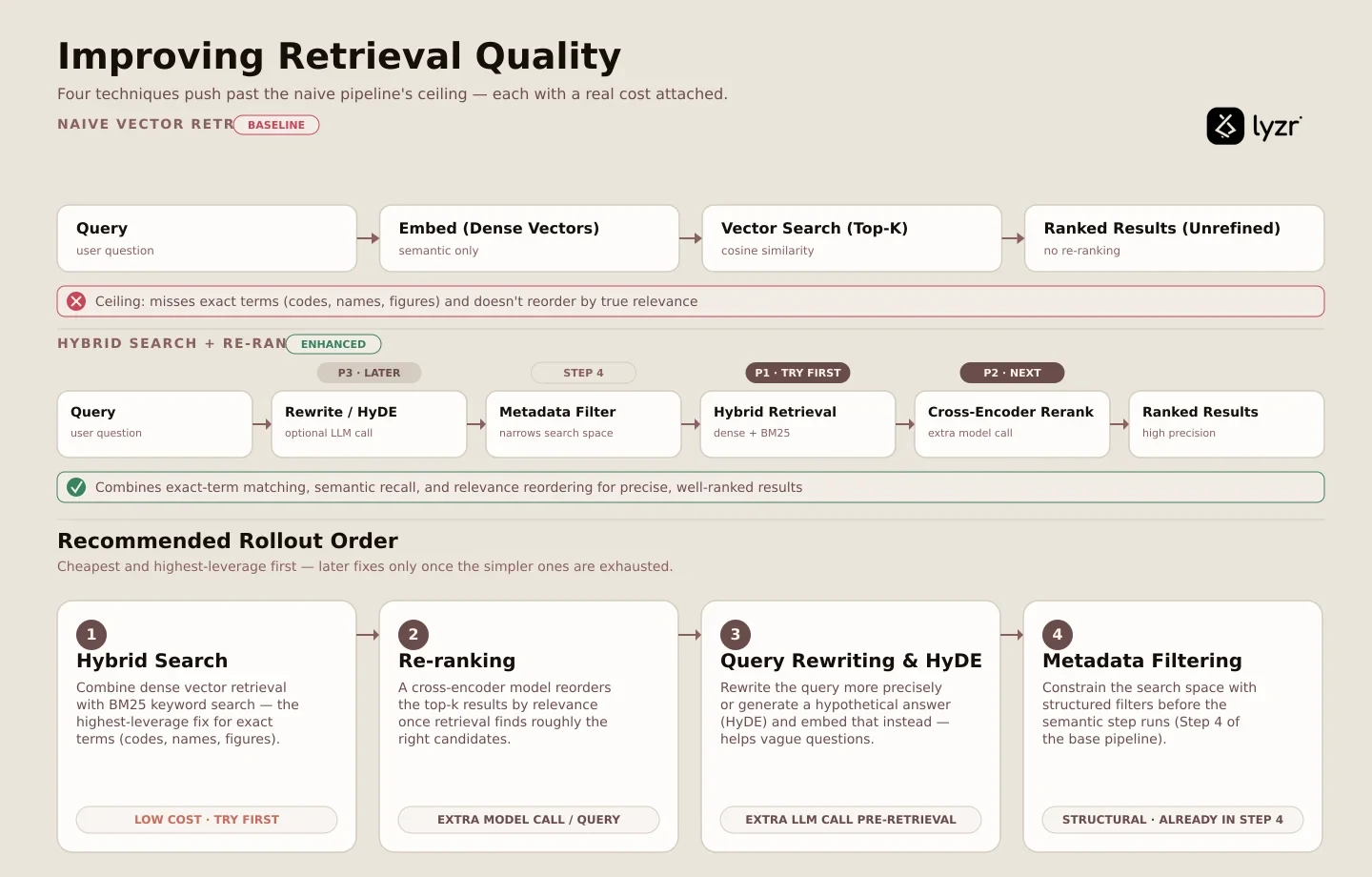
The pipeline above works. It also has a ceiling, and four techniques push past it, each with a real cost attached.
Hybrid search. Combine dense vector retrieval with keyword-based (BM25) search. This is usually the single highest-leverage improvement available, particularly for corpora where exact terms (product codes, names, specific figures) matter and pure semantic similarity misses them.
Re-ranking. A cross-encoder model reorders the initial top-k results by relevance. Meaningful quality gain, meaningful latency cost, since it’s an extra model call per query.
Query rewriting and HyDE. Transform the user’s query before retrieval, either by rewriting it more precisely or generating a hypothetical answer (HyDE) and embedding that instead. Helps with vague or underspecified questions; costs an additional LLM call before retrieval even starts.
Metadata filtering. Constrain the search space using structured filters before the semantic step runs, as covered in Step 4.
Try them in that order. Hybrid search first, because it’s cheap and broadly effective. Re-ranking second, once you’ve confirmed retrieval is returning roughly the right candidates but not ranking them well. Query rewriting and knowledge graphs for structured relationship queries come later, once the simpler fixes are exhausted. Each of these depends on genuine semantic understanding of the query, not just keyword overlap.
How to know if your RAG engine actually works
You know it works when you’ve measured it against a fixed set of real questions, not when the first five you tried looked right.
Spot-checking a handful of queries tells you nothing about the failure distribution across the hundreds of questions real users will ask. Build an evaluation set before you tune anything: fifty to a hundred question-and-expected-source pairs, drawn from real questions if you have them. This single step is the highest-value thing a team can do for RAG quality, and it’s the one almost everyone skips because it doesn’t feel like building.
Three metrics matter, and they need to be tracked separately because they fail differently: retrieval hit rate (was the right chunk retrieved at all), answer faithfulness (is the answer actually supported by what was retrieved), and answer relevance (does it address the question asked). A retrieval failure and a generation failure look identical to a user and require completely different fixes. Agent evals and broader model evaluation practices apply directly here.
Retrieval quality also drifts silently as the corpus grows, since new documents change what the top-k neighbors look like for any given query. Without a fixed evaluation set run on a schedule, the first sign of drift is a user complaint, not a metric. A closer look at evaluating enterprise agents covers this in more depth.
What breaks when RAG goes to production
Five things happen after the demo works that a notebook never shows you.
Corpus growth degrades retrieval. A pipeline tuned against 500 documents behaves differently at 500,000. A top-k of 4 that felt generous becomes insufficient once near-duplicate chunks start crowding out genuinely distinct answers.
Cost scales with query volume, not document volume. Embedding is a one-time cost per document. Retrieval and generation are per-query costs, and adding re-ranking or query rewriting multiplies every single query’s cost, not just the ingestion bill.

Ungrounded output is worse than no output. A system that answers confidently from an irrelevant chunk is more dangerous than one that says it doesn’t know, because the failure is invisible to the user. This is where grounding checks and refusal behavior matter, and it’s what services like a hallucination manager are built to catch. Minimizing hallucinations with model-level controls is one way teams address this directly.
Permissions don’t come for free. If different users should see different documents, the retrieval layer needs access control built in from the start. Retrofitting document-level permissions onto a pipeline that was never designed for them is a painful rebuild, and most tutorials ignore this entirely.
Auditability is a requirement, not a feature. In regulated environments, every answer needs a retrievable trace of exactly what was retrieved and why. A control plane that logs retrieval decisions is what makes that trace possible after the fact.
None of these is a reason not to build. Building your own pipeline gives full control and full ownership of all five problems above, and teams with ML engineering capacity and unusual requirements (specialized domains, custom retrieval logic, strict data residency) are right to do it. Teams that need RAG working under governance constraints, with permissions and audit trails already handled, usually shouldn’t rebuild that infrastructure from scratch. That’s the gap a knowledge base as a service or an agentic RAG layer is designed to close, and it’s also where setting up a knowledge base in Agent Studio picks up where this tutorial leaves off. LLM ops practices, and enterprise deployments generally, tend to surface these five problems earlier than a standalone build expects.
Retrieval isn’t the only place structured enterprise data gets used this way either; teams pairing RAG with AI for data analysis over structured tables run into a related but distinct set of retrieval problems worth knowing about before assuming one pipeline handles both.
Frequently asked questions
How do you build your own RAG model?
You don’t train a model. You build a pipeline: ingest documents, chunk them, embed the chunks, store them in a vector database, then retrieve and pass the relevant ones to an LLM as context.
How do you implement RAG in Python?
Use LangChain or LlamaIndex paired with an embedding model and a vector store. A working prototype, as shown above, runs to roughly fifty lines of code.
How can I use RAG with my LLM?
RAG is model-agnostic. Retrieval happens before the model is ever called, and the retrieved chunks are inserted directly into the prompt as context, so any LLM works.
Can I build a RAG application using LangChain?
Yes. LangChain provides document loaders, text splitters, embedding wrappers, vector store integrations, and retrieval chains that cover the full pipeline shown in this guide.
Why is RAG better than an LLM alone?
It grounds answers in your own data, works with information newer than the model’s training cutoff, and lets you cite sources. An LLM alone can do none of these on its own.
Is ChatGPT a RAG LLM?
ChatGPT is an LLM interface. It uses retrieval when browsing the web or when documents are uploaded, but the underlying model itself is not a RAG system by default.
What is the best LLM for RAG?
Less important than retrieval quality. Most current frontier and mid-tier models handle grounded generation well; poor retrieval cannot be fixed by switching to a better model.
What Python package is used for RAG?
LangChain and LlamaIndex are the most widely used frameworks. Sentence-Transformers covers open-source embeddings, and Chroma, Qdrant, or FAISS handle vector storage.
How do you use MongoDB for RAG?
MongoDB Atlas Vector Search stores embeddings alongside your existing documents, letting you combine vector similarity search with normal database queries and metadata filters.
What is RAG in AI coding?
Retrieving relevant code, documentation, or repository context and supplying it to a model, so generated code matches your actual codebase instead of generic patterns.
Is there a course on RAG for LLMs?
Yes. Hugging Face, DeepLearning.AI, and the LangChain documentation all publish free material covering RAG implementation in depth.
Where this leaves you
The pipeline above is complete and runnable. It’s also the easy 60 percent.
The harder question is what happens six months after launch, when the corpus has tripled, three teams are asking questions your evaluation set never anticipated, and someone in compliance wants to know why the system cited a document it shouldn’t have shown that user. That’s not a code problem. It’s an operating model problem, and it’s worth deciding now, before the corpus grows, whether your team wants to own it or hand the operational layer to something built for it.
If you’ve built the pipeline above and hit exactly that wall, book a demo to see how Lyzr handles retrieval quality, permissions, and audit trails as infrastructure rather than as afterthoughts.
Book A Demo: Click Here
Join our Slack: Click Here
Link to our GitHub: Click Here
Got a use case in mind?
8 weeks from use case to agents running in production.
Platform, people and FDEs, all in. Bring your environment. We'll co-build and stay until it's live.
Talk to UsFree resource
101 AI Agents Use Cases
100+ production-ready AI agent use cases across Marketing, Sales, HR, Banking, Insurance, Operations and a lot more
Download now