TL;DR
- Native agent versioning is linear: your production API key always points to the latest version, so every prompt tweak or model swap is a live change with no safety net.
- Lyzr’s Git for Agents connects any agent in Lyzr Agent Studio to a real GitHub repository, turning instructions, prompts, and model configuration into a versioned codebase.
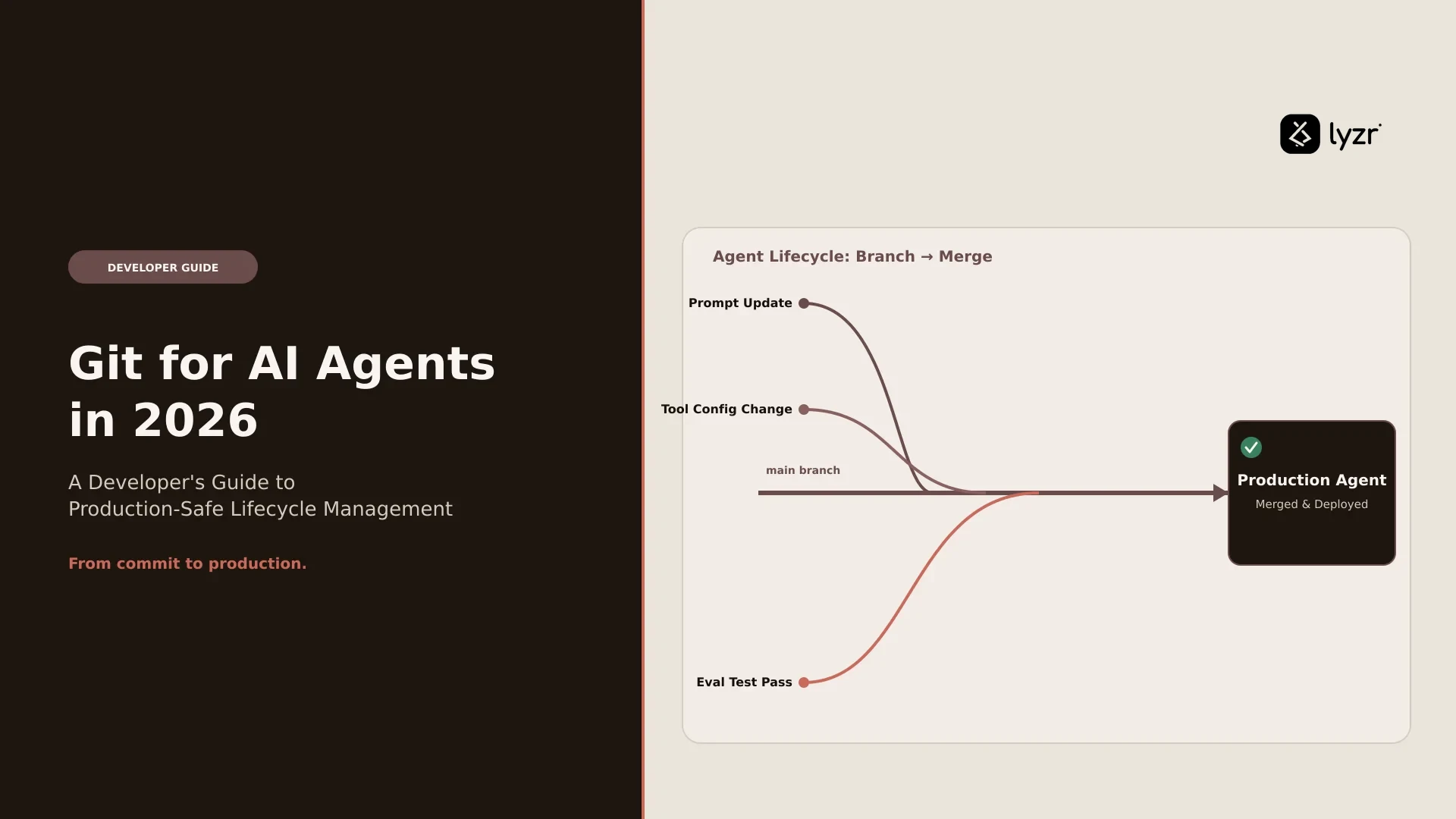
- Agents get branches, commits, pull requests, and merges, the same primitives your engineering team already trusts for application code.
- The core workflow is branch, test, promote: isolate changes on a non-prod branch, validate them, then merge or open a PR into main.
- Bi-directional sync means changes made in Studio and changes made directly in Git (VS Code, GitHub UI, CI) stay consistent in both directions.
- One-click rollback, full commit history, and branch protection turn agent management into an auditable process instead of a black box.
Your production agent doesn’t fail because someone was careless. It fails because someone was curious.
A developer wants to know if a slightly different phrasing in the system prompt improves accuracy. They test it. The test is the deploy. There is no staging environment standing between “let’s see what happens” and every user currently talking to that agent.
That’s the quiet trap most agent platforms set for you. In traditional software, nobody would dream of editing a file directly on the production server and hoping for the best. You branch, you test, you open a pull request, you merge. Somewhere along the way, agent development skipped that step entirely, and most teams didn’t notice until something broke in front of a customer.
The scale of the problem is easy to underestimate.
Forrester predicted that 75% of companies trying to develop AI agents in-house would fail by 2025.
Not because the models were weak or the use cases were wrong, but because the discipline around shipping and governing those agents didn’t match the discipline already applied to every other piece of production software.
This piece covers how to close that gap using Git for Agents, connecting any Lyzr agent to a real Git repository so it can be branched, tested, and promoted the way your team already ships code. You’ll see the exact setup flow, the branch-test-promote workflow, how bi-directional sync works, and what rollback and governance look like once your agent’s configuration lives in Git history instead of a single “latest version” pointer.
Why Does Native Agent Versioning Break Down at Production Scale?
Native versioning breaks down because it’s linear, and linear versioning collapses development and production into the same environment. Lyzr, like most agent platforms, tracks every version of an agent automatically. That’s useful for history. It’s useless for isolation.
Once an agent is productionized, its API key is embedded in your live application. From that point forward, whatever version is “latest” is what your users are talking to. There’s no separation between the version you’re experimenting with and the version answering support tickets.
That single design choice quietly blocks a list of things every engineering team needs to do, which is exactly the kind of gap covered in the hard problems teams hit when running enterprise AI agents:
What Linear Versioning Blocks
| What you need to do | What linear versioning forces you into |
|---|---|
| Test a phrasing change in the agent’s instructions | The change goes live the moment you save it |
| Evaluate a newly released model against your current one | You’re testing on production traffic, with production stakes |
| Try an experimental prompting technique (chain-of-thought, few-shot, structured output) | Any regression is a regression your users see first |
| Fix a broken output format | You’re making the fix under pressure, directly on the thing that’s broken |
This isn’t a Lyzr-specific problem. It’s the industry’s default failure mode for agent development, and it shows up everywhere teams have tried to solve it independently. Prompt-management platforms have converged on the same diagnosis from a different angle.
Each environment should pin to a specific prompt version through an environment tag or alias, not a floating “latest” pointer.
A floating pointer is exactly what most agent platforms give you by default, and it’s exactly what makes every change feel like a small bet against your own production system.
There’s a second, quieter version of this problem too. Model providers change what “the model” means without asking permission.
Model providers update silently, so teams have to pin, freeze, and document specific model versions.
If your agent’s model choice isn’t versioned alongside its instructions, you can wake up to different behavior with zero commits to explain why.
What Does the Git Playbook Actually Solve Here?
The Git playbook solves this by giving agent development the one thing linear versioning can’t: isolation between experimentation and production. Engineering teams already spent decades refining this exact problem for application code. Branches separate work in progress from what’s live. Commits create a durable, inspectable history. Pull requests force a review step before anything reaches the branch that matters.
Version control research on AI systems keeps landing on the same conclusion from different directions.
The best version control system for AI agents is still Git, since agents already understand filesystems and Git commands.
And the reason isn’t nostalgia for a familiar tool, it’s structural.
Git gives changes structure through branches for isolated work, commits for durable checkpoints, diffs for review, and rollback when something goes wrong.
Prompt engineering teams have arrived at the same place independently.
Just as developers use Git to manage source code, AI teams need processes for tracking prompt changes, testing prompt behavior, reviewing modifications, and safely deploying updates.
Other no-code agent platforms are converging on it too.
Treating AI agents like software means building versioning with one guiding principle, treat agents like code.
Git for Agents is Lyzr’s direct implementation of that principle, not a metaphor bolted onto the UI. Connect an agent inside Lyzr Agent Studio to a Git repository, and its configuration, instructions, prompts, model selection, becomes a real codebase with branches, commits, and pull requests. main is production. A feature or non-prod branch is your lab. Promotion happens through the same review gate your application code already goes through.
This is worth separating from Lyzr’s other Git-native project, GitAgent, which takes a related but distinct approach.
GitAgent makes the repository itself the source of truth, instead of scattering prompts, rules, tools, and memory across a codebase or dashboard.
Git for Agents is the lifecycle layer for agents you build and manage in Studio. GitAgent is a framework for building agents that live in your repo from day one. Both point at the same underlying belief: an agent’s configuration deserves the same rigor as its code, a point worth sitting with alongside what actually separates a working AI agent from a prototype that never reaches production.

How Do You Actually Connect an Agent to Git?
You connect an agent to Git through a one-time setup inside Agent Studio that takes a few minutes, regardless of whether the agent is a single-purpose agent or a manager agent orchestrating others.
The flow has four real decisions and two clicks:
- Open the agent in Lyzr Agent Studio.
- Click the Git Connect icon in the top-right corner of the agent view to open the connection panel.
- Fill in the repository details.
- Test the connection, then save.
Git Connect Panel Fields
| Field | What it does | Notes |
|---|---|---|
| Repository Name | Names the GitHub repo backing this agent | If it doesn’t exist yet, Lyzr creates it automatically |
| Personal Access Token (PAT) | Authenticates Lyzr against your GitHub account | A generation link is provided inline, no need to leave the flow |
| Enterprise GitHub URL | Points to a self-hosted or enterprise GitHub domain | Only required if your org runs GitHub Enterprise |
| Branch | Sets the initial branch to connect to | Typically main or master |
Click Test Connection to confirm credentials resolve correctly, then Save & Connect. From that point, every change you make to the agent is a commit, and every historical state of the agent is a point in Git history you can inspect, compare, or return to.
What Does the Branch, Test, Promote Workflow Look Like Day to Day?
The workflow looks like three distinct phases, each with a different owner and a different level of risk. Say your production agent runs on main, and you want to test new instructions alongside a model upgrade, from GPT-4 to Claude to Llama, without touching what’s live.
Step 1: Create a Development Branch
You don’t touch main. You open the GitHub menu at the top of the agent, go to Branches → Create a branch, choose main as the source, and name the new branch something specific, like non-prod or feature/claude-migration.
The moment that branch exists, Studio automatically switches your working context to it. Production keeps serving traffic on main, completely unaware that anything is happening.
This matches what teams building agent infrastructure elsewhere have converged on as the default posture.
The safest default for AI-generated work is branch isolation.
Isolation isn’t a nice-to-have layered on top of the workflow. It’s the entire point of the workflow.
Step 2: Experiment Without Consequence
On non-prod, the constraints disappear. Rewrite the agent’s persona and constraints. Swap models and compare latency, cost, and output quality side by side. Test structured output formats, few-shot examples, or a completely different reasoning approach. Every change is a commit on a branch nobody but your team can see.
This is the moment worth sitting with for a second: the freedom to experiment and the safety of production are not competing goals in this model. They’re the same design decision, expressed twice.
Step 3: Promote With the Right Level of Ceremony
Once non-prod is performing the way you want, promotion happens through the Git menu: Promote branch, set “From branch” to non-prod, “To branch” to main. From there, you choose how much process the change deserves.
Promotion Methods Compared
| Promotion method | What happens | Best fit |
|---|---|---|
| Create an open PR | Opens a pull request in GitHub. An approver reviews the configuration diff and merges it. Conflicts are resolved in the GitHub UI. | Teams, critical production agents, anything that needs a second pair of eyes before it touches users |
| Merge directly | Merges non-prod into main immediately, no review gate | Solo developers, low-risk copy edits, urgent hotfixes where the person merging has full context |
Choosing “Create an open PR” isn’t a formality. It’s what lets agent changes flow through the same review culture, the same audit trail, and the same accountability your engineering org already applies to every other pull request.
Pull requests are the cornerstone of managing AI-assisted development, no matter how advanced the tooling gets.
That principle doesn’t stop being true just because the artifact under review is a prompt instead of a function.
What Does Bi-Directional Sync Actually Change About How Your Team Works?
Bi-directional sync means the agent’s Git repository and its Studio interface never fall out of agreement, no matter which side made the change. Edit the agent visually in Studio, and the commit lands in GitHub. Pull the repo, edit the agent’s configuration file directly in VS Code, and push, and Studio reflects it on next load.
That matters because agent teams are rarely one type of contributor, a reality platform teams run into constantly when standardizing how agents get built across an org. A product manager might adjust instructions through the Studio UI. An engineer might prefer editing the raw configuration in their existing terminal workflow. Neither one should have to leave their preferred environment to stay in sync with the other.
This pattern isn’t unique to Lyzr, it’s becoming the expected baseline for any platform serious about agent version control.
Bidirectional GitHub sync lets agent-native repos connect back to familiar developer workflows when that’s the right product experience.
The difference is where that sync lives: for Lyzr agents, it’s native to Studio, not a bolt-on integration you have to configure separately.
What Happens When Something Goes Wrong After Promotion?
When something goes wrong after promotion, you look at the commit history, find the last known-good state, and restore it, without guessing what changed or reconstructing it from memory. That’s the entire point of treating agent configuration as Git history instead of a single mutable “latest” version.
Every commit on the agent carries its author, timestamp, and hash. Every pull request carries its reviewer comments and approval status. And critically, any previous commit can be restored with a single click, which turns “we think this version was fine” into “we know exactly which version was fine, and we’re back on it.”
This addresses something the broader industry has been circling for a while: agent rollback tends to fail specifically because teams version the wrong layer.
Rolling back an AI agent means versioning the whole operating unit, not just the prompt, because if only one layer is versioned, rollback stays partial and incidents stay confusing.
Git for Agents versions the full configuration, instructions, prompts, and model choice together, as one unit, one commit, one point you can return to.
Traditional SDLC vs. Git for Agents
| Traditional software lifecycle | Git for Agents equivalent |
|---|---|
| Production branch | main |
| Feature or staging branch | non-prod / feature/* |
| Code review before merge | Pull request with diff of agent configuration |
| Deploy pipeline | Branch promotion |
| Rollback to last stable release | One-click restore to a previous commit |
| Branch protection rules | Branch protection on main, enforced from the agent UI |
The value of this isn’t abstract.
Version control enables one-click rollbacks to known-good configurations, which minimizes user impact during incidents.
That’s the difference between a bad prompt change costing you an afternoon of frantic patching and costing you a five-second revert.
Frequently Asked Questions
How do you roll back an AI agent in production?
You roll back by restoring a previous commit on the agent’s connected branch, which reverts its full configuration, instructions, prompts, and model settings together, rather than patching a single field under pressure.
Rolling back an AI agent means versioning the whole operating unit, not just the prompt.
Which is exactly what a Git-backed agent gives you: one commit representing one complete, working state.
Why do AI agents need version control in the first place?
AI agents need version control because their behavior changes constantly, through prompt edits, model swaps, and tool updates, and none of those changes are visible until something breaks downstream. Git-based version control gives each of those changes a branch, a commit, and a reviewable diff, so a regression can be traced to the exact change that caused it instead of triggering a guessing game.
What’s the difference between prompt versioning and Git-based agent versioning?
Prompt versioning typically tracks only the text sent to the model, while Git-based agent versioning tracks the full configuration, instructions, prompts, model choice, and tool settings, as a single connected unit. Teams that version only the prompt often find their rollback incomplete, because a model swap or a tool change can cause the same kind of regression a bad prompt would, without leaving a trace in prompt history alone.
Should you open a pull request or merge directly when promoting an agent?
Open a pull request when the agent is customer-facing, high-risk, or owned by more than one person, since it forces a review of the configuration diff before anything reaches production. Merge directly only for low-risk, small changes on agents where a single developer has full context and the blast radius of a mistake is limited.
What should you log for an AI agent running in production?
You should log every commit’s author, timestamp, and hash, along with the pull request history and approval trail for every promotion to production. That combination is what turns an incident review from “we’re not sure what changed” into a specific, attributable answer within minutes.
Can multiple developers work on the same agent without conflicts?
Multiple developers can work on the same agent by each working on their own branch and resolving conflicts through the standard pull request flow before merging into main. Because the sync between Git and Studio runs in both directions, one developer can work directly in the configuration files while another works in the visual Studio interface, without either one blocking the other.
Where This Leaves Your Next Agent Release
The question worth asking isn’t whether your agent needs version control. It’s whether your team has been treating “latest” as a synonym for “safe” without ever deciding to.
Every agent currently running on a linear versioning model is one prompt edit away from an incident that didn’t need to happen. The fix isn’t a new discipline invented for AI. It’s the same discipline your team already trusts for every other piece of production software, applied to the part of the stack that’s been exempt from it by accident rather than by design, the kind of shift worth mapping into your team’s agentic AI roadmap rather than bolting on after the fact.
Open your next agent in Studio, connect it to a repository, and create a non-prod branch before you make your next change, not after. That single habit is the difference between shipping an experiment and shipping a live incident.
Book A Demo: Click Here
Join our Slack: Click Here
Link to our GitHub: Click Here